
Count the AI licenses your company already pays for, starting with the copilot in your productivity suite and the assistant inside your CRM. Add the two or three tools a department bought on a card last quarter. Now count the workflows that changed because of them. For most lean IT teams that second number sits close to zero, and no new platform closes the gap on its own. The math, as the kids say, isn’t mathing.
Integrating AI into human workflows is the work that turns a license line into capacity your team can really feel. It’s also the step most companies skip between purchase and production. This guide covers how to pick that first workflow and how to run it with a human in the loop. It also covers what to have in place before you touch a second.
The spend already happened, but the workflow never changed
Deloitte’s State of AI in the Enterprise, published in January 2026, reveals some painful truths. 84% of companies have not redesigned jobs or the nature of the work itself around AI capabilities. Another 37% report using AI at a surface level, with little or no change to the processes underneath.
You’ve invested in the tools. The tools are in the building. So why is the work still running the way it ran three years ago?
You can see it at the desk. Someone opens a chat window, pastes in context from one system, reads the answer, and types it into another. The output is slow, but eventually the work gets done.
The workflow is unchanged, because a person is still carrying data between systems by hand. The cost of all that carrying is the human middleware tax, and it’s why a newly implemented AI tool can be everything it was promised to be and still move nothing on your operating numbers.
Integrating AI into human workflows starts with one mapped process
McKinsey’s 2026 State of AI survey makes the case. Among organizations reporting the strongest financial impact from AI, 73% say they have fundamentally redesigned workflows. Getting there doesn’t happen by accident – it takes a plan.
AI workflow integration is a mapping exercise before it is a technology exercise. To begin, pick one workflow and draw it end to end on a single page. Mark where data enters, every person who touches it, and every system it lands in. Then label each step as judgment or transfer.
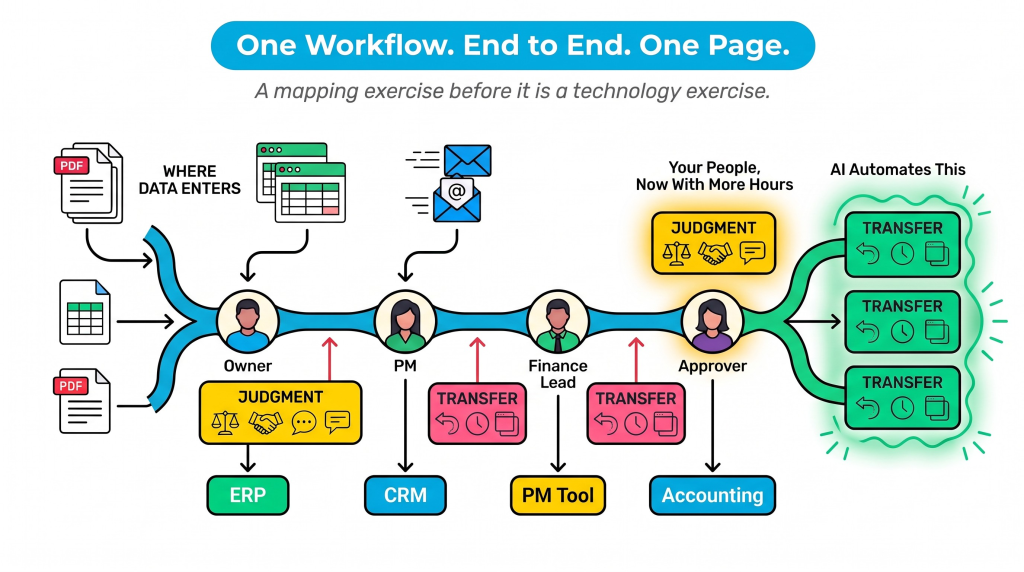
Judgment is the estimate, the approval, the exception call, the vendor relationship. Transfer is retyping, reformatting, chasing a status, and checking one screen against another.
Integration means that AI automates your manual transfer steps, leaving the judgment to your people, who now have more time to do the work that matters.
Most teams find the map holds more transfer than they expected. That’s good news, because transfer is the cheapest thing to move first and the easiest thing to validate.
Pick the first workflow with three questions
Resist the urge to start with the most valuable workflow. Start with the one that answers yes three times.
- Does this workflow run at least weekly? Anything less frequent gives you too little signal to tune.
- Does the same data get entered more than once? Duplicate entry is where the hours hide.
- Can you name the person who approves the output today? If nobody owns it, you cannot verify it, and output that can’t be verified does not belong in a system of record.
The best candidate for integrating AI into human workflows is usually the one your team complains about by name. Invoice coding. Submittal logs. Vendor onboarding. Ticket triage against the asset list. These are unglamorous and repeatable, and they are already costing you people.
What integrating AI into human workflows looks like in practice
Every workflow you bring over runs the same four steps in the same order.
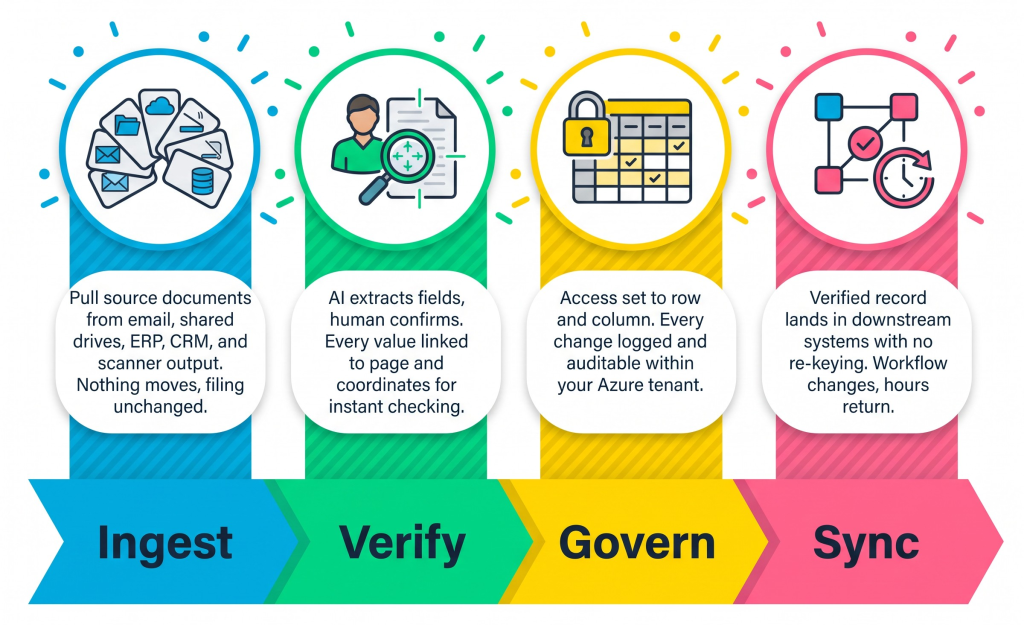
Run those four steps and integrating AI into human workflows stops being a pilot and starts being infrastructure.
A ninety day plan for a lean IT team
A lean IT team reads that four step arc and starts costing out a hiring plan. The arc is buildable without one, because the hard parts here are decisions rather than code. You do not need a platform team. You need a platform to begin with.
The connective layer between your systems used to justify three headcount. That layer is now something you configure. What stays with you is the part only you can do. You name the owner of each workflow, set the approval rule, and decide what the system may do on its own. This is why integrating AI into human workflows is a governance question before it is an engineering question.
Your headcount does not change. How your people spend their time will.
Weeks 1 to 2. Inventory the AI you already pay for. List every license, who holds it, and what it was used for this month. Most teams find seats they are billed for and nobody opens.
Weeks 3 to 6. Map the one workflow that answered yes three times. Write down the current cycle time and the number of manual touches. You need the before number, because nobody will remember it in March.
Weeks 7 to 12. Run ingest, verify, govern, and sync on that single workflow, with the same people approving the same outputs they approve today. Measure the hours returned and where your team spent them. One or two workflows typically remove 60 to 80 percent of the manual data movement inside them.
Once you’ve finished, write down what you learned before you pick the second one. AI workflow integration compounds when a lean team repeats one pattern until it is boring. Five simultaneous pilots will outrun your ability to verify any of them.
Getting started
You don’t need a bigger budget to begin. You need one workflow, one owner, and a before number. Integrating AI into human workflows on a single process will teach you more in six weeks than another year of evaluations.
When that first workflow returns hours, your people spend them on the work you hired them for. That’s the whole point of integrating AI into human workflows, and you start seeing the ROI by the second month.
For IT and operations leaders
Everyone can generate an app. Almost no one can run one safely.
One governed place for every app, workflow, and AI action. In your tenant, your data stays yours.
Book an assessment