
Construction Document Analysis Just Got Faster: Project Summaries, RFP Navigation, and Canvas Controls
PreCon’s latest release strengthens construction document analysis across every stage of the pre-construction bid management workflow. Projects are easier to organize and prioritize, RFP documents can now be navigated by table of contents and analyzed by section, and AI Chat is more stable and persistent throughout.
Project Management
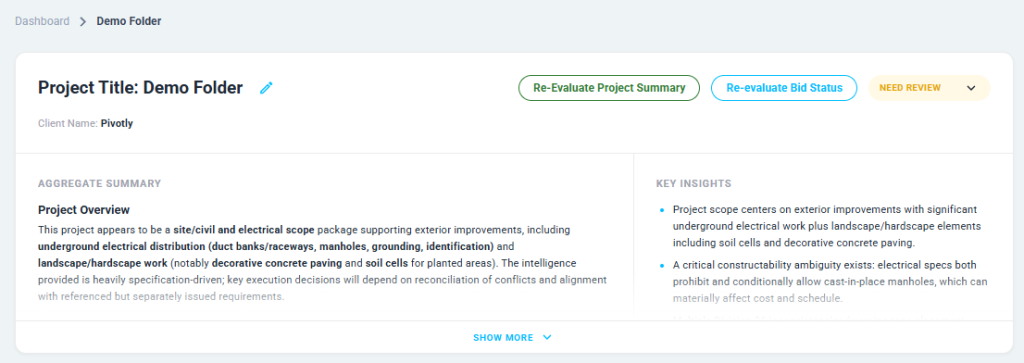
AI-Generated Project Summary
What changed:
The Project Overview now displays an aggregated AI summary pulled from construction document analysis results across all documents in the project. You can generate or re-evaluate it on demand.
Why it matters:
Instead of opening each document individually to get a read on full project scope, the summary surfaces key information in one place before you dive in.
Submission Date on Projects
What changed:
Projects now include a submission date field, visible on the project card and sortable from the project landing page.
Why it matters:
Bid deadlines drive pre-construction bid management priorities. Submission date on the project card means your team can sort and prioritize without opening individual projects to find the date.
Archive Functionality
What changed:
Projects and documents can now be archived, removing them from your active view without permanent deletion.
Why it matters:
Awarded, lost, or paused bids accumulate quickly. Archive keeps your workspace clean while preserving everything you may need later.
CSI Number Display
What changed:
Subdivision rows now show the CSI number before the name, highlighted in blue.
Why it matters:
Faster to scan, easier to navigate within a large construction document analysis output.
RFP Analysis: Navigate and Scope by Section
TOC Extraction and Navigation
What changed:
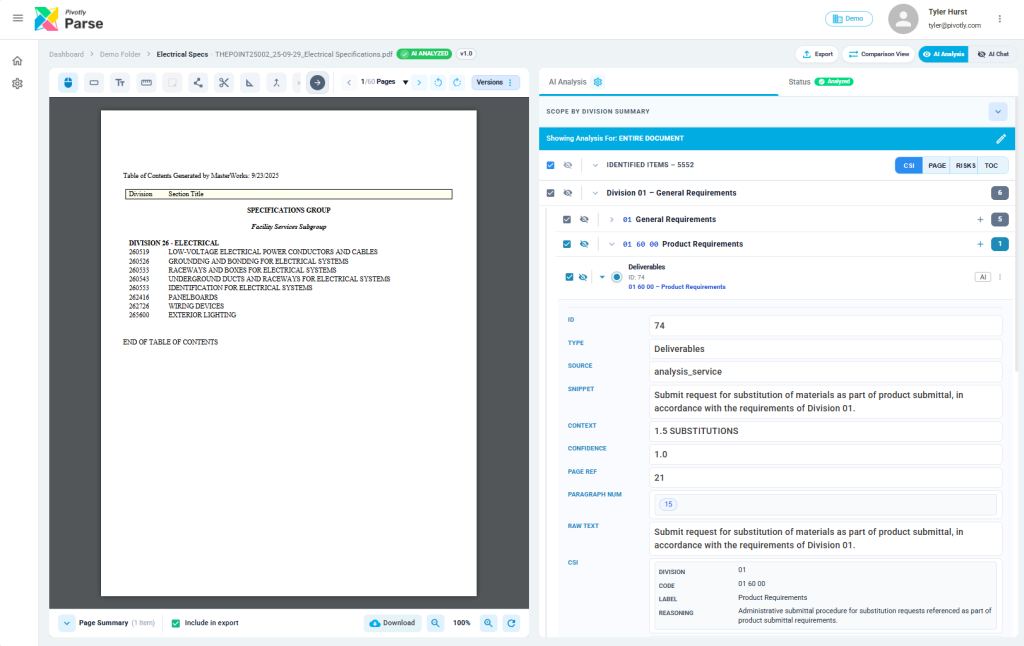
PreCon now extracts the table of contents from RFP documents automatically. The analysis view includes TOC-based navigation so you can jump directly to sections within the document.
Why it matters:
Large RFPs can run hundreds of pages. TOC navigation gives your team a map of the document and a faster path to the section that matters, making RFP analysis software work the way estimators actually read.
Section-Scoped Construction Document Analysis
What changed:
AI analysis can now be scoped to specific RFP sections rather than running across the full document.
Why it matters:
Focus extraction on the scope items relevant to a specific trade without re-running construction document analysis on the entire bid package.
Canvas and Drawing Controls
Canvas Rotation
What changed:
Documents on the canvas can now be rotated.
Why it matters:
Construction drawings are not always scanned in the correct orientation. Rotation fixes that without leaving PreCon.
Dynamic Object Detection Updates
What changed:
The configuration panel now opens automatically when detection starts. Detection can also be run against a manually selected set of shapes. Notes and keynotes are now available as a detection type under technical drawings.
Why it matters:
More control over what gets detected, with less setup friction.
Manual Scale Selection
What changed:
Scale can now be set manually on the canvas when automatic detection does not produce the right result.
Why it matters:
Ensures quantity takeoffs calculate correctly on drawings where auto-detection falls short.
Construction Document Analysis: AI Chat Improvements
Persistence Between Chat and Analysis
What changed:
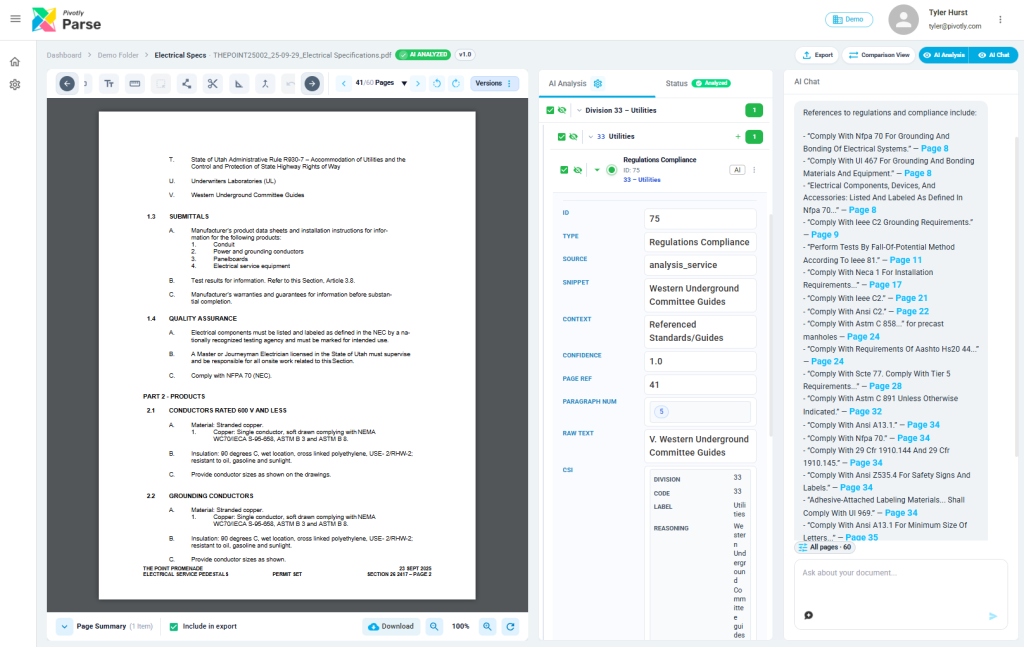
Switching between AI Chat and AI Analysis no longer resets your session. Both panels hold their state.
Why it matters:
Cross-referencing chat answers against extracted results is a core part of construction document analysis. You can now move between the two without losing your place in either.
Stability and Prompt Updates
What changed:
AI Chat error handling, loading states, and flickering issues have been resolved. Prompts for both Project and Document AI Chat have been updated.
Why it matters:
More reliable chat behavior and better responses across the board.
Extraction Quality
Valve and Material Extraction
What changed:
Valve and material extraction now runs as a dedicated pipeline with improved accuracy and direct Excel export.
Why it matters:
Cleaner, more reliable output for mechanical and piping scopes with no manual reformatting after export.
Bid Extraction
What changed:
Bid extraction now includes schema validation and data sanitization to support pre-construction bid management at scale.
Why it matters:
Extraction errors are caught in the pipeline before they reach the estimator.
These updates are live now!
Generate a Project Summary, upload an RFP and navigate by table of contents, and run section-scoped analysis on a specific division. Tell us what is working and where we can improve.
Let's try one of your documents